Sunday, May 23, 2010

internet privacy

internet privacy...ha!...now there's an oxymoron for you! In light of the ongoing Facebook fuss regarding privacy here's ten tips on how to adjust your Facebook privacy settings and a couple of You Tube videos that I stumbled upon during the week. Show them to your students - today! It gets the message across to them, loud and clear.


On another note, who has caught onto the fever accompanying the new doodle (Google's term for its events and holiday specific logo's) the interactive Pac man to celebrate 30 years since the launch of the familiar smiley face. How cool is that!  It's very, very addictive, takes me back to my youth!

If you're a techie yourself, a zip folder of the files to download, thanks to azabani are here.  The sound doesn't work so here is a tip from dwelc at google support on how to get the sound working
"I downloaded the GooglePacman.zip, and extracted it. At first, the sound didn't work. Then, you have to go to the Flash Control Panel at http://www.macromedia.com/support/documentation/en/flashplayer/help/settings_manager04.html, then press "Edit Locations", then "Add Location", then "Browse for Folder", then select the folder you extracted the files to. After that, the sound worked fine for me!"
and finally, have a look at macek's redesigned "insert coin" option here

Well as someone twittered a couple of days ago, "they can't ban Google in schools" so keep a look out for Pac man addicts in your classroom.

Wednesday, May 12, 2010

water hydrant...

Have you heard that phrase from Mitchell Kapor "Getting information off the internet is like taking a drink from a fire hydrant!"  How true!

As a link from my previous post on the iPad here is a long list of online textbooks and bare essential online resources that I recommend from Science and Chemistry teachers, note that I use the term "textbook" very loosely.  I shall post another blog on superb video clips, relevant songs, excellent interactives that help students to visualise particles on a microscopic scale, contextual resources etc.. Well here goes, don't drown in it all...

Chemistry specific online textbooks

W.W. Norton & Company. Chemistry The Science in context, 2nd edition  Paid registration is required for the ebook however the quizzes, flashcard, animations & interactives are freely available.
Chemguide, Jim Clark  This is very text orientated but is easy to follow with good explanations and simple images.
An introduction to Chemistry, Mark Bishop  There are powerpoints, animations and tutorials all as a part of this e-book.
McGraw Hill Online Learning Center Another good online textbook with wonderful visuals showing microscopic images of particles in solution and quizzes that give immediate feedback.
Re:act Nuffield Advanced Chemistry contains text, audio, quizzes, suggestions for investigations and encourages students to submit questions for the authors to answer.
Pearson Prentice Hall Chemistry: The central science has multiple choice quizzes with instant feedback and good videos to accompany the text
Avogrado Chemistry Choose a chapter from the drop down menu and after reading the text students can try the interactive activities and quizzes which have instant feedback.
IB Chemistry interactive syllabus 2009 An excellent summary with useful images and animations on the usual Chemistry topics that are assessed for the International Baccalaureate as well as most other syllabus's.

To view molecules in 3D, Chime is what you'll want to use, download Chime for free from here http://www.umass.edu/microbio/chime/getchime.htm  Chime will show up in a browser, usually Internet Explorer for all .pdb files (protein database)
3D Virtual Chemistry library set up by Imperial College, London, UK contains 150 molecules relevant to most curriculums.
Get students to make up molecules using Chemsketch, then convert them to a .pdb file to view in 3D, download Chemsketch for free from here http://www.acdlabs.com/resources/freeware/chemsketch/ It is pretty straightforward to use, if needed there is a user guide here http://bbruner.org/obc/chemsket.htm
Students can design their own molecule and upload it to Hull University website

For something quick and easy that required no additional programs use this....molecule 3d.
                                        
Finally, from a Chemistry point of view, it's also useful to download the RSC Chemistry font here, once downloaded move the folder to Start -- Control Panel -- Font

 Chemistry plus Biology and Physics textbooks
Vision Learning An excellent site that relates science to real life and contains many interesting anecdotes, interactive activities and glossaries that are available in both English and Spanish

Physics
Fear of Physics, there is a good range of videos, text and help for students who need some help with their physics
PhET simulations, go there...use these activities, they are superb!
PhysicsLAB from Mainland school, Florida has excellent, easy to understand text with clear diagrams and some animations
Physics for you, endless creative and original resources from Professor Messer to accompany the very popular quality textbook of the same name.

Science online textbooks
Skool, UK Choose either Key Stage 3 or 4 from the top of the webpage. Key Stage 3 (11 - 13 years of age) or Key Stage 4 (14 - 16 years of age) contains excellent tutorials followed by end of topic quizzes.
BBC Bitesize Revision quick tutorials, excellent images, animations and audio which can be followed by a test which gives instant feedback.
Active Science there are some good resources here to download and some good interactive games.
Teachers domain, as recommended on one of my previous blogs.  There are just superb videos, animations, worksheet, additional teacher information here, register as a user (for free) and download resources that are relevant to your curriculum, tell your colleagues in other subjects about it too.
School Science this one is a bit of a resource bank, it'll take you some time to work through it, once again, sift through what is useful for your students
Woodlands Junior School, Kent Well done to Mandy Barrow who has put together a range of interesting revision activities in an engaging and easy to use manner for 11 - 14 year olds
PBS Teachers Science concepts are linked to everyday experiences via the usual multimedia, spend some time here and pick and choose what interests you.
Scholarnet, Online Learning Paid registration is required however there are some free demo versions available with online text and animations to reinforce understanding

This is just the tip of the iceberg, I have many url's on specific topics to recommend which I'll post up to my Delicious account when I have a minute or 20.

The beauty of the internet is that it is a library at our fingertips, you surf the net to get information about something which leads you to ask yourself more questions so you continue surfing to find out about a (usually) related topic and so it...it's a vicious cycle....a spider web....domino effect which is very addictive....

Tuesday, May 4, 2010

the iPad or back to the books?

So the Apple iPad...what do we think of it?
On the one hand it's been a negative response from some bloggers
"The iPad is like a computer only more expensive and doesn't empower students"

"Why I won't buy and iPad (and think you shouldn't, either)

"You can’t just make some single wonderful shiny demo product. You need to keep producing them; you need some way of economizing that process. And you need to stop others from making their shiny thing cheaper than, yet interchangeable with, yours."

Danny O'Brien

While on the other hand, there is a positive view of the iPad from other bloggers

"whatever else, this thing will be awesome in the classroom."

"I truly believe the iPad will revolutionize the classroom in a multitude of ways....In my opinion, the six biggest things the iPad will change in schools and education are textbooks, note taking, paperless classroom, studying and reviewing, student interest level, and individualized curriculum."

Sam Thompson who is a Technology instructor working at a school in Utah has started a blog titled "All things related to the iPad in schools".  Each week he intends to showcase an iPad application that has a potential use in education by testing it in the classroom and suggesting how teachers or students could use it.  I'm looking forward to hearing more from him and learning about his successes of using the iPad in the classroom.

I am very fortunate to work in a laptop school, every student has a laptop. In most other schools around the world students access to computers through a computer lap, the school library and COWS (portable Computers On Wheels that can be moved from one classroom to another).  I'm wondering what are the advantages (if any) of the iPad over a student laptop (either a PC or an Apple), here's my thoughts...

Advantages
That is fantastic for teachers and students who are visually impaired, perhaps also useful for those learning foreign languages.  It remains to be seen as to whether the Author's Guild will issue copyright violations against Apple as they did against Amazon's Kindle 2 reader last year, which resulted in Amazon giving rights-owners the choice to disable the audio function of their books.
My thoughts: Well that's all well and good but thanks to the net there are phenomenal range of superb up to the minute podcasts available to students as it is without having an iPad.

Number 2: The iPad reduces the need for students or schools to purchase numerous textbooks thus reducing cost to students, reducing the weight that they'd have to carry to and from school.  Besides online textbooks are so much more than just text but blended with animations, video clips and interactive activities.  Text on the online textbooks can be underlined and highlighted.
My thoughts: Most textbooks come with a DVD of which the textbook is available as a pdf with can have sticky notes and text highlighted using Adobe Professional. Also, a screen print of the text can be taken and then edited in Fireworks. As with all online texts these days the textbook is accompanied by a DVD with numerous videos and interactive activities.

Number 3: Students can use a iPad to take notes in class by writing on the iPad screen with a stylus, the words are converted to typewritten text and saved.  If students are absent from a lesson they can get the class notes emailed to them from their teacher or a friend.
My thoughts: Nothing fancy there, many students type notes for themselves in class, others write their own personal class notes and given that their end of year exams will be in a written format, I usually encourage them to do so.  Students have access to word docs (such as class notes and laboratory instructions) powerpoints, animations etc that they can download from the school intranet.  If students are absent they usually email me and I send them on the relevant class notes.  Similarly, students email their homework to me and I edit and mark it in Microsoft Word using tools -- track changes.

Number 4: Differentiated student centred learning is encouraged through the use of the iPad applications which encourage students to work at their own pace through different interactive activities.
My thoughts:  It's my belief that the 21st century classroom should be students centred with teachers acting as facilitators.  Every classroom is mixed ability, therefore teachers should provide a range of differentiated activities for their students.  Without question, a school intranet set up on a platform such as moodle can provide a range of differentiated learning activities for students such as specific urls, graded hot potato quizzes and interactives.  Similarly as can a range of science investigations, creative work and group collaborative discussions.  The iPad is yet another means by which to provide a range of differentiated activities.

Some more disadvantages from my point of view...
As yet there is no discount for educational institutions.
As yet, the iPad does not have a webcam which is really useful for students to social network and discuss their work via Skype.
iPad applications need to be purchased but there are many free flash animations, videos etc available for free online.
The iPad is a viewing device for media but shouldn't we be encouraging our students to rest their eyes from the flicker of a computer screen and read their way through a leaves of a good ol fashioned book!
The iPad is a viewing device, it doesn't encouraging our students to be creative learners.

So all in all, to conclude...yes, the iPad is yet another aesthetically pleasing piece of technology from Apple but for now, I'm quite happy using my laptop to access free flash animations, online textbooks, videos and interactives etc that are all available online.

I'm off out for a coffee and a browse through the newspaper at the top ten recommended books (paper ones!) to read this week. 

Sunday, April 25, 2010

weird & wonderful wonders

Students love a good yarn!  There are many weird and wonderful holiday snapshots and stories that help our students to realise that there is so much more to science than the 4 walls of the lab that they go to a few times a week.  On the first day of a new term I usually ask if any student would like to volunteer a story from their holidays, where possible we link their story to science.


For me, experiencing the solar eclipse at approx 11:15am on 11th of August 1999 while perched on a clifftop at Land's End on the southwest coast of England was the most phenomenal natural wonder that I have ever experienced.  The excitement of the hundreds of people waiting patiently as they gripped nervously onto their overpriced mirrored lenses glued into a flimsy cardboard frame.  The concern at the increasing number of clouds in the grey, gloomy sky on what was a typical English summers day.  The metallic, reflective, calm sea growing darker as the moon started to block the sun's light.  The fast forward effect of only 15 minutes for darkness to fall from daylight.  The birds stopped singing, dogs stopped barking and the mood felt quite errie as silence descended over all of us.  The strange sensation of sitting in complete darkness for what seemed like an eternity but was only really a couple of minutes.  Once the golden rays from that soon to be orb in the sky started to shine through the clouds there was complete joy and excitement accompanied by loud cheers and clapping as we had all shared this magical, one in a lifetime experience of a total solar eclipse.

There are endless tales we can tell of geological areas, nature parks, theme parks that we have visited that all link back to science in the classroom eg. with links to geology, diversity, evolution, forces etc... It makes science so much more real and interesting for our students. 

I have lifted the following images and text from this website http://webecoist.com/2009/01/18/nature-phenomena-wonders-natural-world/.  The images of these 7 different natural wonders speak for themselves.

Number 1: Sailing stones
"The mysterious moving stones of the packed-mud desert of Death Valley have been a center of scientific controversy for decades. Rocks weighing up to hundreds of pounds have been known to move up to hundreds of yards at a time. Some scientists have proposed that a combination of strong winds and surface ice account for these movements. However, this theory does not explain evidence of different rocks starting side by side and moving at different rates and in disparate directions. Moreover, the physics calculations do not fully support this theory as wind speeds of hundreds of miles per hour would be needed to move some of the stones."
image & text from http://webecoist.com/2009/01/18/nature-phenomena-wonders-natural-world/.
Number 2: Basalt columns
"When a thick lava flow cools it contracts vertically but cracks perpendicular to its directional flow with remarkable geometric regularity – in most cases forming a regular grid of remarkable hexagonal extrusions that almost appear to be made by man. One of the most famous such examples is the Giant’s Causeway on the coast of Ireland (shown above) though the largest and most widely recognized would be Devil’s Tower in Wyoming. Basalt also forms different but equally fascinating ways when eruptions are exposed to air or water."
image & text from http://webecoist.com/2009/01/18/nature-phenomena-wonders-natural-world/.
Number 3: Blue holes
 "Blue holes are giant and sudden drops in underwater elevation that get their name from the dark and foreboding blue tone they exhibit when viewed from above in relationship to surrounding waters. They can be hundreds of feet deep and while divers are able to explore some of them they are largely devoid of oxygen that would support sea life due to poor water circulation – leaving them eerily empty. Some blue holes, however, contain ancient fossil remains that have been discovered, preserved in their depths."
image & text from http://webecoist.com/2009/01/18/nature-phenomena-wonders-natural-world/.
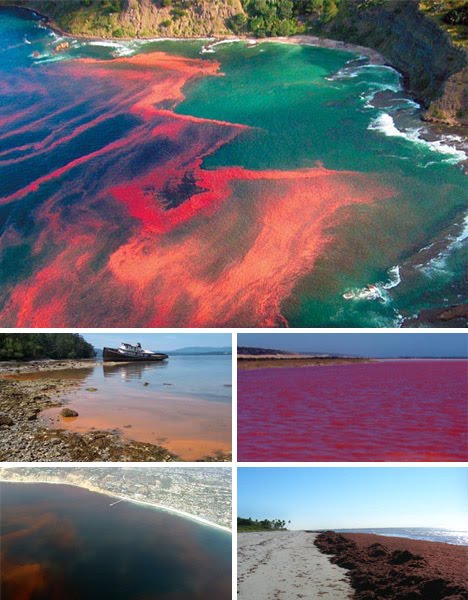
 Number 4: Red tides
"Red tides are also known as algal blooms – sudden influxes of massive amounts of colored single-cell algae that can convert entire areas of an ocean or beach into a blood red color. While some of these can be relatively harmless, others can be harbingers of deadly toxins that cause the deaths of fish, birds and marine mammals. In some cases, even humans have been harmed by red tides though no human exposure are known to have been fatal. While they can be fatal, the constituent phytoplankton in ride tides are not harmful in small numbers."
image & text from http://webecoist.com/2009/01/18/nature-phenomena-wonders-natural-world/.
Number 5: Ice circles
"While many see these apparently perfect ice circles as worthy of conspiracy theorizing, scientists generally accept that they are formed by eddies in the water that spin a sizable piece of ice in a circular motion. As a result of this rotation, other pieces of ice and flotsam wear relatively evenly at the edges of the ice until it slowly forms into an essentially ideal circle. Ice circles have been seen with diameters of over 500 feet and can also at times be found in clusters and groups at different sizes as shown above."
image & text from http://webecoist.com/2009/01/18/nature-phenomena-wonders-natural-world/.
Number 6: Mammatus clouds
"True to their ominous appearance, mammatus clouds are often harbingers of a coming storm or other extreme weather system. Typically composed primarily of ice, they can extend for hundreds of miles in each direction and individual formations can remain visibly static for ten to fifteen minutes at a time. While they may appear foreboding they are merely the messengers – appearing around, before or even after severe weather."
image & text from http://webecoist.com/2009/01/18/nature-phenomena-wonders-natural-world/.
Number 7: Fire Rainbows
"A circum-horizontal fire rainbow arc occurs at a rare confluence of right time and right place for the sun and certain clouds. Crystals within the clouds refract light into the various visible waves of the spectrum but only if they are arrayed correctly relative to the ground below. Due to the rarity with which all of these events happen in conjunction with one another, there are relatively few remarkable photos of this phenomena"
image & text from http://webecoist.com/2009/01/18/nature-phenomena-wonders-natural-world/. 
 Does anyone have any suggestions regarding unusual wonders of the natural world or must see places around the world?  I'd like to start planning my summer holidays and am need of some suggestions.  Thanks!